How I use Claude Code on the job
I recently gave an internal workshop on agentic coding with Claude Code. Preparing for it forced me to articulate what I do differently now versus when I started. This post is the distilled version.
One thing upfront: as Boris Cherny (creator of Claude Code) has said, there is no single best way to work with Claude. What follows is how I get the most out of it.
In this post:
- First principles: Polya's problem solving
- Context is everything
- The loop in practice
- Agent teams: the next level
- Failure patterns
- Security
- One last thing
First principles: Polya's problem solving
The framework I keep coming back to isn't from AI or software. It's from a 1945 math book.
George Polya's How to Solve It lays out four principles of problem solving: understand, plan, execute, and look back. It maps almost perfectly to how I use Claude:
1. Understand - Brainstorm the problem space. What are we solving? What constraints exist?
2. Plan - Devise a concrete plan with steps, dependencies, and verification criteria before writing code.
3. Implement - Execute the plan. Let Claude carry it out with guard rails in place.
4. Verify - Look back. Run tests, check the UI, review what worked.
The most common mistake I see (and made myself early on) is jumping straight to step 3. One-shotting prompts has its place, but for anything non-trivial, just telling Claude "implement this feature" isn't going to cut it. The more time you invest in step 2, the better the outcome. I've lost entire sessions to bad plans.
Context is everything
Claude Code works inside a finite context window. Everything lives in it: your conversation, files read, command outputs, CLAUDE.md instructions, loaded skills, MCP tool definitions, system prompts. When the window fills up, Claude auto-compacts older content, blurring earlier details. I've had it forget constraints I set ten messages ago.
The single most important habit: context hygiene. One task per conversation. If direction changes, start fresh. I use ccstatusline to keep token usage, context fill percentage, current branch, and active model visible at a glance. Hard to practice context hygiene when you can't see the context.

Claude's extensions are really context controls that manage what's in the window and reduce manual oversight:
- CLAUDE.md - Always-on rules that load every session. Keep it lean; over-specifying wastes context on every interaction.
- Skills - Reusable prompt packages, loaded on demand. I use obra/superpowers for brainstorm, planning and execution workflows. Unlike CLAUDE.md, they only eat context when invoked.
- MCPs - Tool interfaces to external systems (Jira, Playwright, Slack). The catch: tool definitions live in context. Wire up fifteen MCPs and you're burning window space before starting. Tool Search helps with on-demand discovery.
- Sub-agents - Isolated parallel workers with their own context window. You get back a summary, not the whole trace.
- Hooks - Run scripts on events (pre/post tool use) without spending tokens. I use them for lint, test triggers, and notifications.
The loop in practice
Here's how the four Polya steps play out day-to-day.
Step 1: Understand (Brainstorm)
I don't start by describing what I want built. I start by making sure Claude and I understand the problem.
For non-trivial work, I use the obra/superpowers brainstorm skill. Pull the Jira epic/task and associated confluence articles for a given problem (via Atlassian MCP), point to relevant context in codebase, and brainstorm approaches. One thing that helps: have Claude write its findings to a markdown file rather than just discussing in chat. A persistent document you can review catches misunderstandings that a conversation would bury. Sometimes Claude's understanding is wrong, and that's the point: catch it here, not three files deep into implementation.
Step 2: Plan
Imo this step matters most.
I ask Claude to write a detailed implementation plan: what files to modify, what tests to write, what verification to run, and how steps depend on each other. Point Claude at existing open-source implementations of what you're building. It anchors the plan in real patterns instead of theoretical designs.
Crucially, persist the plan as a .md file (e.g. .claude/plan-feature-x.md), not chat messages. A file you can read, edit, and diff beats a plan buried in conversation history that gets compacted away. I edit the plan multiple times before execution. I'll add constraints, remove steps, reorder, or add verification Claude missed. The plan becomes a contract.
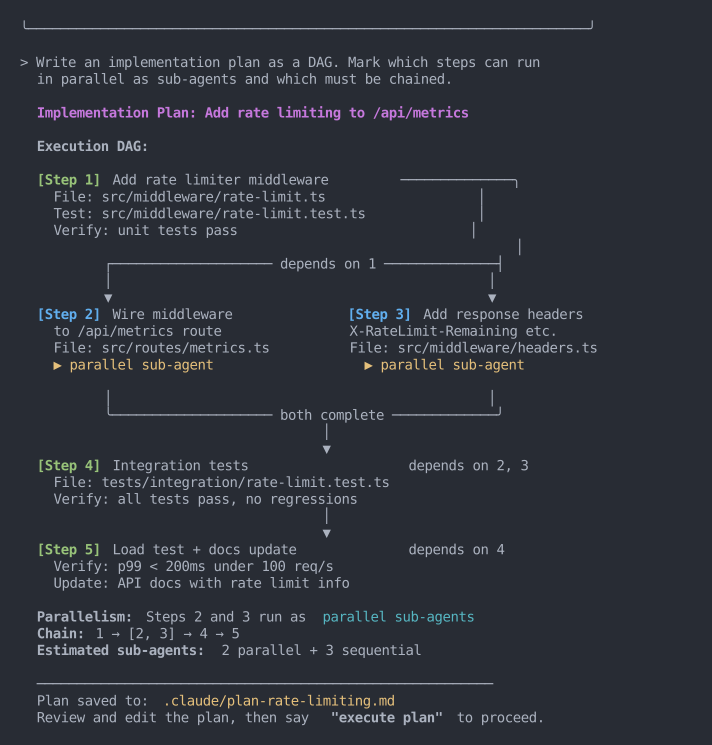
A technique I like: structure the plan as a decision tree or a DAG (directed acyclic graph). Instead of a flat list, it becomes a dependency graph where independent steps run in parallel via sub-agents and dependent steps chain:
Step 1: Set up database schema
Step 2: Write API endpoints (depends on 1)
Step 3: Write frontend components (depends on 1)
Step 4: Write integration tests (depends on 2, 3)
Step 5: UI validation with Playwright (depends on 3)
Steps 2 and 3 run as parallel sub-agents. Step 4 waits for both. Faster execution, tighter context per sub-agent.
Step 3: Implement
Once the plan is solid, I mostly just monitor. Claude executes step by step, spinning up sub-agents for parallel branches. My role is monitoring: watching for plan drift, checking verification steps pass, nudging when needed.
For larger tasks, hooks automate verification. A PostToolUse hook runs the linter after every file edit, a test hook runs the suite after a module is complete. No tokens spent.
Step 4: Verify (Look Back)
Not just "do tests pass." A broader check:
- Tests pass - Unit, integration, whatever the plan specified.
- UI looks right - Playwright MCP or agentshot for visual verification.
- Plan was followed - Any steps skipped or deviated?
- No regressions - Existing functionality still works?
The whole loop, from Jira ticket to open PR, happens without leaving the terminal.
Agent teams: the next level
Claude recently shipped agent teams, taking the sub-agent pattern further. Instead of isolated workers reporting back, agent teams are full Claude Code sessions that communicate with each other, share a task list, and self-coordinate.
Where I've found this useful: giving teammates distinct personas. For example:
- A frontend specialist focused on component architecture and UX
- A backend engineer on API design and data modeling
- A principal engineer who reviews each teammate's output for architectural consistency, edge cases, and cross-cutting concerns
- A critic whose only job is to poke holes in every proposal
The critic and principal engineer matter most. Without them, Claude settles on the first workable approach. Unlike sub-agents, teammates talk to each other directly, not just back to you. Still experimental and burns tokens, but I've had good results on complex cross-cutting problems.
Failure patterns
These cost me time before I named them:
- Kitchen sink session - Too many unrelated tasks in one conversation. Context gets muddled. One task per session.
- Correcting over and over - Third correction for the same issue? The approach is wrong. Reset context, reframe the problem.
- Over-specified CLAUDE.md - Entire coding style guides in always-on context. Move non-essentials to skills.
- Trust-then-verify gap - Only checking the final result. A wrong assumption in step 2 compounds through steps 3, 4, 5. Bake verification into the plan.
- Infinite exploration - Claude reads file after file without scope. Use sub-agents so only the summary comes back.
- Skipping the plan - A thrown-away implementation costs more than five minutes reviewing a plan.
Security
With agentic coding, the attack surface expands. Three things worth attention:
Prompt injection - Untrusted text (a README, a Jira comment, a fetched web page) can steer the agent into unsafe actions.
Permission fatigue - After fifty "approve" clicks, you stop reading. Use allowlists so you only get prompted for things that matter.
Tool/MCP risk - Network-capable tools expand what the agent can reach. Only use trusted providers, scope permissions tightly.
Tools I recommend:
- claude-security-guidance - A security reminder hook that warns about potential security issues when editing files.
- claude-code-safety-net - A PreToolUse hook that blocks destructive git/filesystem commands before they run. Designed to not interfere with normal workflows.
- leash - Runs agents in a containerized environment and manages mounts/config, keeping blast radius contained.
- Sandboxed VMs - I wrote about my sandbox setup previously.
- Scoped access tokens - Fine-grained GitHub PATs limited to a single repo.
One last thing
Even if you don't adopt the full brainstorm-plan-implement-verify loop, one habit worth picking up: before jumping into implementation, just tell Claude to ask you 5 clarifying questions first. It feels like a small thing, but those questions catch stuff you'd otherwise miss.
Garbage in, garbage out. Same is with agentic coding.