Local LLMs on my Mac, on demand
I often find myself pasting rough text drafts into Claude or Codex with some version of:
Here is a draft text I wrote, fix it for grammar and technical coherence. Keep it concise, but stay close to the original spirit and writing style.
It's a boring use case, but a very frequent one. Draft Slack messages, notes, email fragments, internal-ish writing. Nothing classified, but also nothing that really needs a round-trip to an external API. The per-request cost is tiny, but still tokens aren't free, and sustainable AI is a preference for me.
At the same time, open models are getting good enough now for a lot of daily work. So I set out to build a local LLM setup I can use for such trivial tasks. Not a full agent setup or RAG, just a model that runs locally ensuring privacy, can fix my texts and not sit in my Mac's memory all day.
The machine
My machine is an Apple silicon MacBook Pro M4 with 32GB of unified memory and 512GB of SSD storage running macOS Tahoe 26.
That 32GB memory ceiling matters, as it is enough to run useful local models, but not enough that I want a large model occupying a huge chunk of it all day.
What actually fits?
With local models, the questions boil down to: will it fit in RAM while leaving enough memory for other tasks and will it be efficient enough for my use case?
I used llmfit to get a better sense of what options are available and what fits my machine.
If you have uv set up, just run:
uvx llmfitI wanted a chat model that would function optimally, not just the largest one that fit. So I ended up piloting with:
Mistral-Small-3.2-24B-Instruct-2506-4bitThere are probably better models every few weeks now, but this was a good enough baseline.
Ollama vs MLX
Once I settled on a model, the next thing I needed was a tool to serve it locally.
The obvious first option is Ollama. It is easy and quick to set up and the model ecosystem is broad. If I wanted the fastest path to "local model works", I would probably start there.
But on a Mac, I wanted to try the Apple-native path properly. And MLX is Apple's framework designed for efficient machine learning on Apple silicon.
The rough split in my head:
- Ollama: easiest local model UX, RAG prototypes and CLI/API usage
- MLX: better fit for an M-series Mac as it's native to Apple's stack and designed around unified memory
So for this setup, I went with MLX.
First MLX run
Install mlx-lm:
uv tool install mlx-lmThen run chat:
mlx_lm.chat --model "mlx-community/Mistral-Small-3.2-24B-Instruct-2506-4bit"It will first download the model from Hugging Face. If HF downloads are slow, or you are downloading gated models, login first or setup your HF_TOKEN if you already have one:
uvx --from huggingface_hub hf auth loginOr set a token:
export HF_TOKEN="hf_..."The first run downloaded the model and then started a terminal chat. And it worked! I pasted a few rough paragraphs, asked it to fix grammar and make them concise, and the output was fast and good enough.
Back to the requirements
After the terminal setup worked, I stepped back. What did I actually need?
- A local model fast enough to be functional
- Runs on demand, doesn't camp in my tiny 32GB of memory all day
- A chat UI
The "runs on demand" bit was necessary as I wanted something I could open, use for a few minutes, and then get the memory back. So I first tried getting Codex to build me a small wrapper Python app on MLX. The plan was:
- Streamlit UI
- mlx-lm under the hood
- editable system prompt
- chat history
- manual unload and model idle TTL
Codex one-shotted a Python script for me, that worked on the surface but had some bugs. Also, it was too long and complex for what I wanted for such a tool. So I went around browsing for open-source software (OSS) options and found oMLX.
oMLX
oMLX ended up matching the shape of the problem much better than my little Streamlit idea.
It's an MLX inference server for Apple silicon with a built-in chat UI, and comes with fully configurable model-lifecycle options.
The oMLX dashboard also gives a one-click command generator for wiring it into Claude Code, Cursor, or any OpenAI/Anthropic-compatible client.
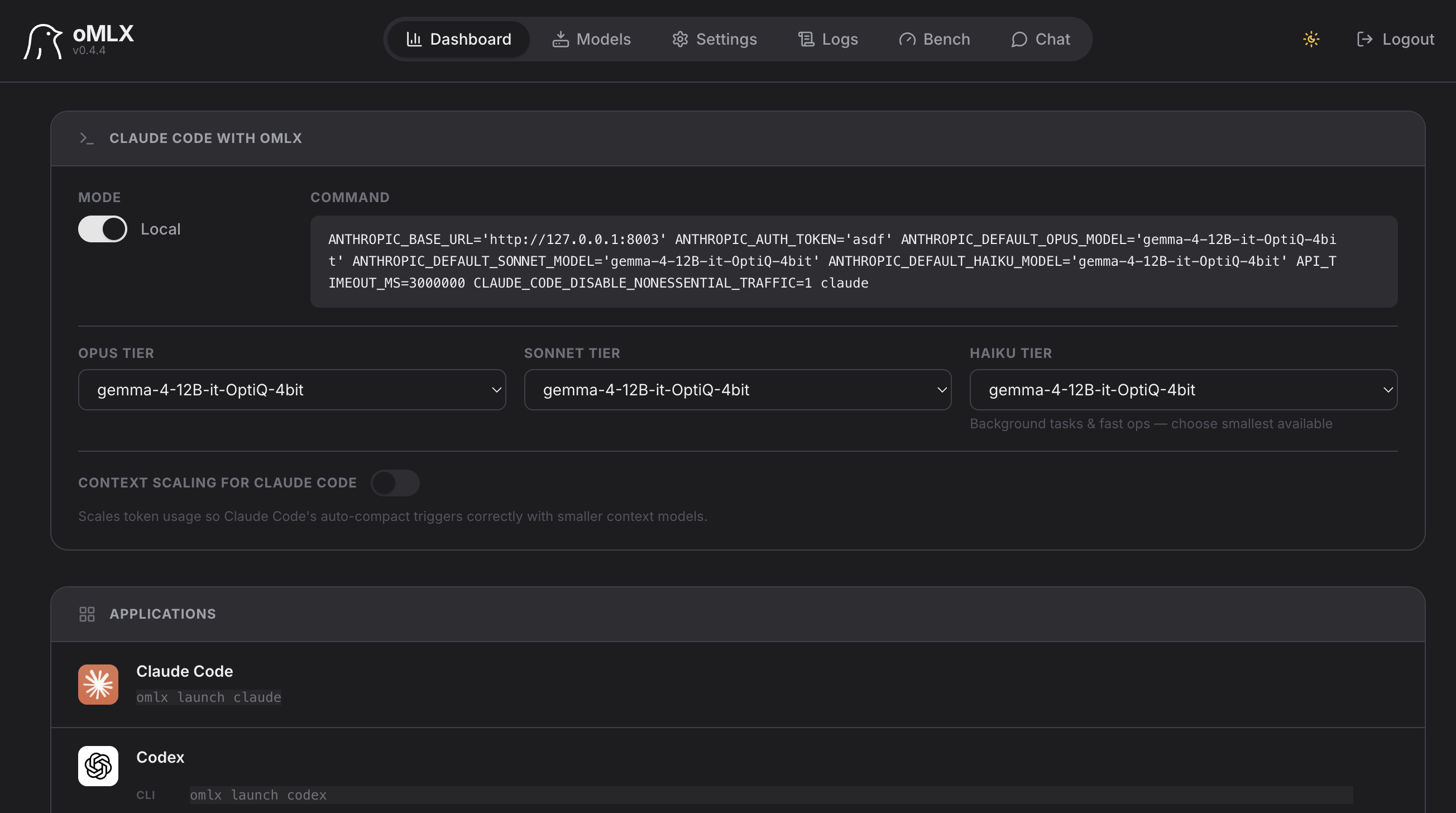
Compared with Ollama, the bigger differentiator in oMLX is KV cache persistence. oMLX stores cache blocks on SSD, so long-context sessions can recover previous context more efficiently instead of recomputing everything when the prompt shifts.
So I can have oMLX running, but it will not keep a large model in memory indefinitely. Only loads the model when I need it, lets me chat, and then I can either unload manually or let my configured 3-min idle TTL clear it.
Where I landed
I settled with a Gemma model gemma-4-12B-it-OptiQ-4bit with oMLX. It's compatible with my config and after a few iterations with Qwen and Mistral models I found gemma-4 the best to work with. It's fast enough to be functional, loads in ~17s and has a 7.4 T/s token generation speed, perfectly fine for my use case!
Local models of course aren't full replacements for frontier hosted models (yet!), but they are perfectly adequate for this class of work where simple coherence passes are needed for technical or grammatical purposes on draft texts.
And running them locally also avoids privacy concerns, costs less, and lets me iterate quickly without relying on paid APIs while being in control of memory footprint.
Alternatives
Local AI is getting better by the day and now you can even run the current open-weight SOTA GLM-5.2 on local hardware.
A few alternatives in the local inference space that are also worth mentioning:
- LM Studio lets you discover, download, and locally serve open models from one UI
- Jan is a proper desktop app and has MLX support
- Unsloth lets you run and train OSS AI models on your own local hardware via an open-source UI
- Rapid-MLX is a high-performance Apple silicon inference engine engineered for speed.
For me, oMLX won out. Works perfectly for my needs and matched my memory lifecycle requirement better.